


Sometimes Google Ads Conversion tags show the status failed in Google Tag Manager Preview mode, even though the tag fired correctly and Google Ads received the conversion.
This is a false positive. The failed status does not affect your actual tracking or reporting in Google Ads.
Why it happens
The issue usually occurs when the Conversion Linker tag writes the click ID to a cookie with a non-standard name. Google Ads expects this ID in a cookie with the prefix _gcl. If the name is different or missing, GTM Preview mode can label the tag as failed, even though the processing still works.
How to fix it
Set the same custom cookie prefix in both tags.
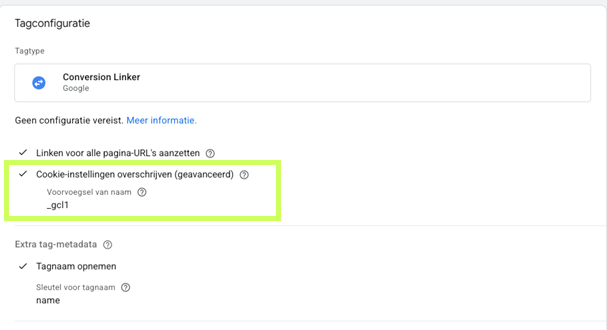
Step 1 – Conversion Linker tag
- Open your Conversion Linker tag
- Under Advanced Settings, turn on Override cookie settings
- Set the cookie prefix to
_gcl1(or another value you use consistently)
Step 2 – Google Ads Conversion or Remarketing tag
- Open the matching Google Ads tag
- Scroll to Conversion linker settings
- Enter the same cookie prefix (
_gcl1)
Then test and publish your changes.
Related pages
 Google Ads client-side issue: another reason Google Ads tags can show as failed
 Guide on fixing errors GTM server-side
- Guide on fixing errors GTM client-side